
YouTube is making it easier for creators to reach viewers on both traditional screens and the Shorts feed without running two completely separate livestreams.
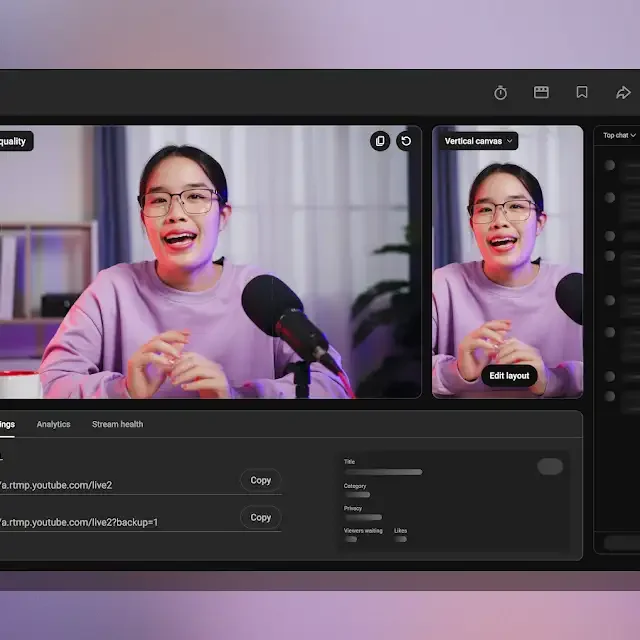
The platform is introducing expanded dual-format livestreaming tools that can deliver horizontal and vertical versions of the same broadcast simultaneously. Viewers watching on a desktop or TV can get the conventional widescreen experience, while people discovering the stream through the Shorts feed can see a mobile-friendly vertical version.
More importantly, YouTube isn't treating them as two entirely separate broadcasts. Both formats can share a single live chat, keeping the audience together even when viewers are watching through different layouts.
For creators, that could remove one of the biggest headaches of streaming to an increasingly mobile-first audience: deciding whether a livestream should be designed for a TV screen or a phone.
Creators can choose between three layouts.
Fit to phone width resizes the stream so its width fits a mobile display. This can be useful when keeping more of the original horizontal composition visible is important.
Stacked creates stacked versions of the stream and gives creators more control over how each feed is positioned within the vertical frame.
Center crop takes a more straightforward approach by automatically cropping the horizontal video around the center of the screen.
The right option will depend heavily on the type of content being streamed. A centered talking-head broadcast, for example, may work reasonably well with an automatic center crop, while gameplay, interviews, presentations, or multi-camera productions could benefit from a more carefully arranged layout.
That distinction matters because simply cutting the sides off a 16:9 livestream doesn't always create a good vertical video. Important graphics, people, gameplay elements, or text can easily disappear outside a 9:16 frame.
YouTube's new layouts are essentially an attempt to solve that problem without forcing every creator to build a separate vertical production.
The company says horizontal and vertical formats will automatically be enabled as the default streaming configuration in YouTube Studio.
That means a creator can start with a conventional horizontal livestream and YouTube can generate a vertical presentation designed for viewers on mobile devices.
Creators who don't want YouTube creating a vertical version can disable the feature.
The option can be found in YouTube Studio > Live Control Room > Stream Settings > Dual stream. Turning Dual stream off prevents a vertical layout from being generated from the horizontal broadcast.
Instead of allowing YouTube to automatically reformat the horizontal video, streamers can produce separate horizontal and vertical layouts using their own broadcasting software.
To do this, creators first enable dual-format streaming in their layout settings and change the vertical layout option from automatic processing to Encoder.
YouTube Studio then provides unique stream keys for the different layouts. Those keys can be entered into compatible encoding software, allowing the creator to send separately prepared feeds to YouTube.
Before starting the broadcast, both versions can be checked through the preview to make sure the horizontal and vertical compositions look correct.
This is arguably the more interesting part of the update for professional creators.
Rather than relying on an algorithm to decide what part of a widescreen video should appear vertically, a streamer can design a dedicated 9:16 composition while still delivering a full 16:9 version to viewers on larger displays.
Traditional YouTube video was built around horizontal viewing. TVs, desktop monitors, laptops, and most long-form videos still naturally favor 16:9 content.
Shorts works differently.
Its vertical, swipe-based feed is designed primarily around smartphones, where 9:16 video fills the screen. A conventional horizontal livestream displayed inside that environment either wastes a significant amount of screen space or needs to be cropped.
Creators therefore face two different viewing environments on the same platform.
Producing separate streams could solve the problem, but it also adds complexity. Two broadcasts can mean separate production layouts, stream configurations, and potentially fragmented audiences.
YouTube's dual-format approach tries to separate the presentation without separating the livestream itself.
One broadcast can effectively have two visual versions depending on where it is being watched, while viewers remain connected through the same live chat.
It's that YouTube is making vertical livestreaming part of its standard live-production workflow.
For creators, the Shorts feed potentially becomes another distribution surface for the same live content rather than requiring a completely separate vertical production.
A creator could build a polished horizontal stream for subscribers watching on computers and TVs while simultaneously offering a vertical version suited to viewers discovering the broadcast on their phones.
And creators with more advanced production setups don't have to settle for an automated crop. They can create a purpose-built vertical feed through an encoder while keeping both versions connected to the same livestream experience.
There will still be some production decisions to make. Text size, overlays, camera framing, screen sharing, and graphics that look good in 16:9 won't necessarily translate cleanly to 9:16.
But that's precisely why YouTube's combination of automatic layouts and custom encoder support is significant.
Instead of asking creators to choose between horizontal and vertical live video, YouTube is increasingly treating them as two presentations of the same broadcast.
For anyone already livestreaming on YouTube, that could make the next question less about which format to stream in and more about how each version of the same stream should look.
The platform is introducing expanded dual-format livestreaming tools that can deliver horizontal and vertical versions of the same broadcast simultaneously. Viewers watching on a desktop or TV can get the conventional widescreen experience, while people discovering the stream through the Shorts feed can see a mobile-friendly vertical version.
More importantly, YouTube isn't treating them as two entirely separate broadcasts. Both formats can share a single live chat, keeping the audience together even when viewers are watching through different layouts.
For creators, that could remove one of the biggest headaches of streaming to an increasingly mobile-first audience: deciding whether a livestream should be designed for a TV screen or a phone.
YouTube adds three vertical layouts for livestreams
YouTube Studio is getting new layout options that can automatically transform a horizontal livestream into a vertical version.Creators can choose between three layouts.
Fit to phone width resizes the stream so its width fits a mobile display. This can be useful when keeping more of the original horizontal composition visible is important.
Stacked creates stacked versions of the stream and gives creators more control over how each feed is positioned within the vertical frame.
Center crop takes a more straightforward approach by automatically cropping the horizontal video around the center of the screen.
The right option will depend heavily on the type of content being streamed. A centered talking-head broadcast, for example, may work reasonably well with an automatic center crop, while gameplay, interviews, presentations, or multi-camera productions could benefit from a more carefully arranged layout.
That distinction matters because simply cutting the sides off a 16:9 livestream doesn't always create a good vertical video. Important graphics, people, gameplay elements, or text can easily disappear outside a 9:16 frame.
YouTube's new layouts are essentially an attempt to solve that problem without forcing every creator to build a separate vertical production.
Dual-format streaming will be enabled by default
YouTube is also making dual-format streaming more than an optional feature hidden deep inside Studio.The company says horizontal and vertical formats will automatically be enabled as the default streaming configuration in YouTube Studio.
That means a creator can start with a conventional horizontal livestream and YouTube can generate a vertical presentation designed for viewers on mobile devices.
Creators who don't want YouTube creating a vertical version can disable the feature.
The option can be found in YouTube Studio > Live Control Room > Stream Settings > Dual stream. Turning Dual stream off prevents a vertical layout from being generated from the horizontal broadcast.
Professional streamers can send their own vertical feed
Automatic layouts are convenient, but YouTube is also giving creators using third-party encoders more control.Instead of allowing YouTube to automatically reformat the horizontal video, streamers can produce separate horizontal and vertical layouts using their own broadcasting software.
To do this, creators first enable dual-format streaming in their layout settings and change the vertical layout option from automatic processing to Encoder.
YouTube Studio then provides unique stream keys for the different layouts. Those keys can be entered into compatible encoding software, allowing the creator to send separately prepared feeds to YouTube.
Before starting the broadcast, both versions can be checked through the preview to make sure the horizontal and vertical compositions look correct.
This is arguably the more interesting part of the update for professional creators.
Rather than relying on an algorithm to decide what part of a widescreen video should appear vertically, a streamer can design a dedicated 9:16 composition while still delivering a full 16:9 version to viewers on larger displays.
Why YouTube wants one livestream in two formats
The update reflects a broader problem YouTube has created for itself as Shorts has become a major part of the platform.Traditional YouTube video was built around horizontal viewing. TVs, desktop monitors, laptops, and most long-form videos still naturally favor 16:9 content.
Shorts works differently.
Its vertical, swipe-based feed is designed primarily around smartphones, where 9:16 video fills the screen. A conventional horizontal livestream displayed inside that environment either wastes a significant amount of screen space or needs to be cropped.
Creators therefore face two different viewing environments on the same platform.
Producing separate streams could solve the problem, but it also adds complexity. Two broadcasts can mean separate production layouts, stream configurations, and potentially fragmented audiences.
YouTube's dual-format approach tries to separate the presentation without separating the livestream itself.
One broadcast can effectively have two visual versions depending on where it is being watched, while viewers remain connected through the same live chat.
This could make Shorts more important for live discovery
The bigger story isn't simply that YouTube added several new cropping options.It's that YouTube is making vertical livestreaming part of its standard live-production workflow.
For creators, the Shorts feed potentially becomes another distribution surface for the same live content rather than requiring a completely separate vertical production.
A creator could build a polished horizontal stream for subscribers watching on computers and TVs while simultaneously offering a vertical version suited to viewers discovering the broadcast on their phones.
And creators with more advanced production setups don't have to settle for an automated crop. They can create a purpose-built vertical feed through an encoder while keeping both versions connected to the same livestream experience.
There will still be some production decisions to make. Text size, overlays, camera framing, screen sharing, and graphics that look good in 16:9 won't necessarily translate cleanly to 9:16.
But that's precisely why YouTube's combination of automatic layouts and custom encoder support is significant.
Instead of asking creators to choose between horizontal and vertical live video, YouTube is increasingly treating them as two presentations of the same broadcast.
For anyone already livestreaming on YouTube, that could make the next question less about which format to stream in and more about how each version of the same stream should look.


