


DirectStorage is one of those Windows gaming features that sounds amazing on paper — and when everything lines up, it actually is.
Designed for modern NVMe SSDs and GPU-based decompression, DirectStorage can dramatically reduce game loading times by letting games pull data straight from storage to the GPU, skipping old CPU bottlenecks. It’s available on Windows 11 and limited builds of Windows 10, but not every PC that runs those systems actually supports it.
Before expecting instant load screens, it’s worth checking whether your hardware and system configuration are truly ready. Here’s the fastest way to find out.

What You Need for DirectStorage to Work
At a high level, DirectStorage requires:
- A compatible version of Windows (Windows 11 is best)
- A supported GPU
- An NVMe SSD (SATA SSDs don’t qualify)
- Proper driver and system configuration
Instead of guessing, Windows gives you a built-in tool that shows everything in one place.
How to Check DirectStorage Support on Your PC
Step 1: Open Xbox Game Bar
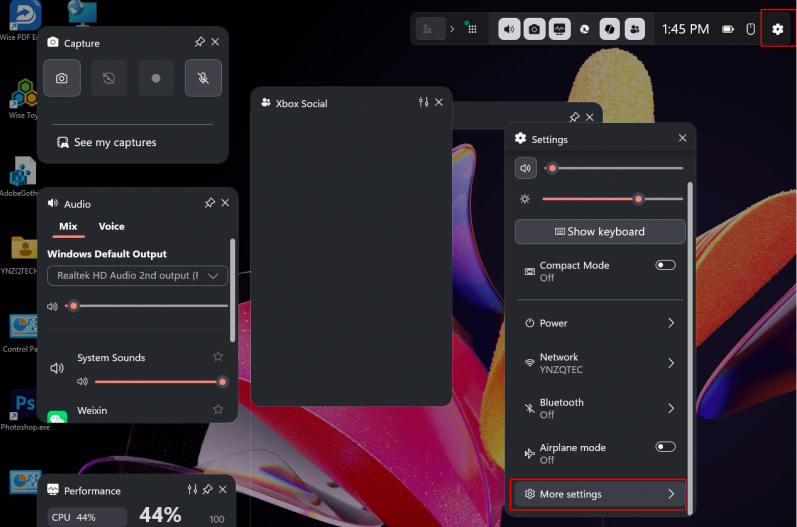
Press Windows + X on your keyboard to open Xbox Game Bar.
Once it appears, click the gear icon (Settings), then select More settings to expand the options.
Step 2: Go to Gaming Features
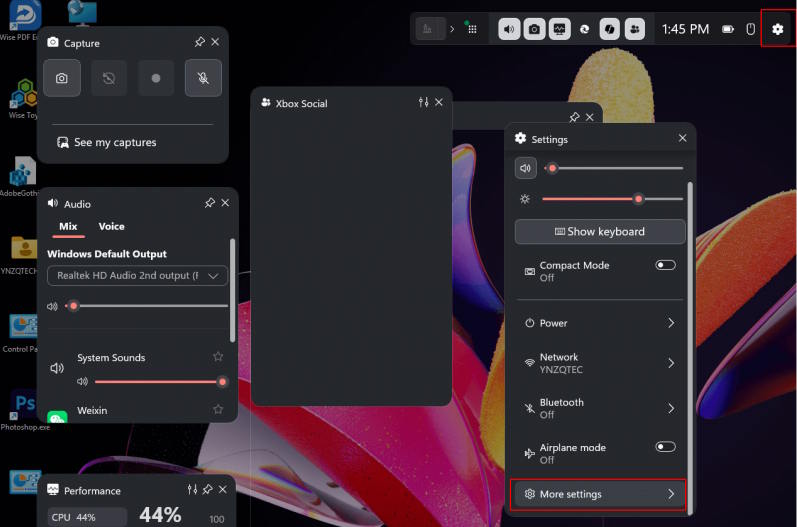
Inside the settings menu, look for and click on Gaming features.
This section is specifically designed to show system-level gaming capabilities that Windows detects automatically.
Step 3: Check DirectStorage Status

On the Gaming Features screen, find the Graphics and DirectStorage section.
Here, Windows will tell you:
- Whether your GPU supports DirectStorage
- Whether your storage drive meets the requirements
- Whether your Windows version is compatible
Each item will be clearly marked as supported or not supported, so there’s no guesswork involved.
A Reality Check: DirectStorage Isn’t Widespread Yet
Even if your system fully supports DirectStorage, don’t expect every game to benefit.
As of now:
- Only a small number of PC games actually use DirectStorage
- Most titles still rely on traditional loading methods
- Adoption is gradual, not universal
That said, support is growing. If you’re building or upgrading a gaming PC today, having DirectStorage compatibility is a smart way to future-proof your system.
Final Thoughts
DirectStorage isn’t magic — it won’t suddenly make old games load instantly. But when the hardware, operating system, and game all align, the difference can be very real.
Checking support takes less than a minute, and it gives you a clear answer about whether your PC is ready for the next generation of faster game loading.
If your system doesn’t support it yet, at least you’ll know exactly what’s holding it back — and what to upgrade when the time comes.